Agentic Search with Toast 1
A single search returns the chunks closest to one query. That works for lookups, but breaks down on questions that need multiple sources, span several time periods, or hide their best phrasing from the user. Agentic Search wraps the search endpoint in a loop driven by Toast 1, our specialized search model: the agent runs parallel sub-queries, analyzes metadata facets, inspects retrieved results, and decides whether to search again before submitting a final ranked chunk list.
The response shape is identical to a normal search (a ranked list of scored chunks), so Agentic Search is a drop-in upgrade for quality-sensitive queries. If you want to run Toast 1 against your own tools instead of the hosted loop, see Build your own harness.
When to use it
Reach for Agentic Search when one search is not enough. Typical signals:
- The question fans out across multiple entities, years, or sources (e.g. "Compare revenue, headcount, and churn across 2020 to 2025").
- The user phrasing is conversational and underspecified, but the underlying answer needs precise terminology.
- A single top-k list keeps missing relevant chunks and/or includes irrelevant chunks because the right query isn't obvious upfront.
It is slower than a single search because of the extra LLM calls and retrievals, so use plain Search for narrow lookups and reach for Agentic Search when quality matters more than latency.
Basic Usage
Agentic Search is powered by Toast 1, our specialized
search agent. Enable it by setting search_options.agentic to true:
from mixedbread import Mixedbread

mxbai = Mixedbread(api_key="YOUR_API_KEY")

results = mxbai.stores.search(
    query="What are the yearly numbers for 2020, 2021, 2022, 2023, 2024, 2025?",
    store_identifiers=["yearly-reports"],
    search_options={"agentic": True},
)

print(results)
The output uses the same shape as the normal search response. When agentic is
enabled, rewrite_query and rerank are ignored, since the agent handles query
decomposition and ranking itself.
Stream traces
Set stream to true to watch the agent's trace while the search is running,
instead of waiting for the entire search to finish. Streaming is available only
for Agentic Search, so search_options.agentic must also be enabled.
from mixedbread import Mixedbread

mxbai = Mixedbread(api_key="YOUR_API_KEY")

events = mxbai.stores.search(
    query="How did revenue change from 2024 to 2025?",
    store_identifiers=["yearly-reports"],
    search_options={"agentic": True},
    stream=True,
)
For a full list of event types, see streaming events.
How it Works
Each agentic search runs as a bounded loop:
- Initial search and metadata. The original query is run as-is while compact metadata facets are fetched for the selected stores. This guarantees the exact phrasing is always represented in the candidate pool, even if the agent later goes off in a different direction.
- Plan and retrieve. The agent inspects results, then either submits a
ranking or issues up to 8 parallel retrieval calls:
search_corpusfor focused semantic sub-queries,grepfor exact tokens, codes, identifiers, and regex patterns, andfilter_chunksfor metadata-first filtering and sorting. Aprune_contexttool lets the agent drop chunks it has ruled out to stay within its context budget. - Iterate. Step 2 repeats until the agent has enough context or exhausts its budget of 4 rounds (the final ranking turn included). New chunks are merged into a deduplicated pool.
- Submit ranking. The agent calls
submit_rankingwith the chunks it considers most relevant. Withstrict_top_k=true, the agent fills the ranking totop_kchunks and the result is capped attop_k.
If the agent stops without submitting a ranking, the service forces one final ranking call so you always get a result back.
Configuration
Pass an object instead of true to steer the agent:
from mixedbread import Mixedbread

mxbai = Mixedbread(api_key="YOUR_API_KEY")

results = mxbai.stores.search(
    query="What are the yearly numbers for 2020, 2021, 2022, 2023, 2024, 2025?",
    store_identifiers=["yearly-reports"],
    search_options={
        "agentic": {
            "strict_top_k": True,
            "instructions": (
                "Search for revenue, profitability, and headcount trends before ranking the results."
            ),
        }
    },
)

print(results)
Parameters
All fields under search_options.agentic are optional.
| Parameter | Type | Default | Description |
|---|---|---|---|
instructions | string | null | Free-form guidance appended to the agent's system prompt (up to 5,000 characters). Use it to bias the agent toward specific entities, metrics, source types, or ranking criteria. Followed only when not in conflict with the built-in search rules. |
strict_top_k | boolean | false | When true, the agent fills the ranking to top_k chunks from what it retrieved and the result is capped at top_k; fewer are returned when the agent retrieved fewer. When false, the agent can return all the chunks it considers relevant. |
Example instructions
"Prefer primary sources over summaries when both are available.""Prioritize the most recent fiscal year, then compare year-over-year.""Treat tables and figures as authoritative; treat marketing copy as weak signal."
Combining with other features
The fields outside search_options.agentic still affect the agentic run:
top_k: target result size, and the size the result is capped at whenstrict_top_k=true.filters: applied to local store retrievals, not just the original.file_ids: local store retrievals are constrained to these files.store_identifiers: semantic and wide retrievals search across all listed stores. Includemixedbread/webto let the agent pull in web search results alongside your own stores.search_options.score_threshold: applied as a final filter after ranking; can return fewer thantop_kchunks even withstrict_top_k=true.
search_options.rewrite_query and search_options.rerank are ignored when
agentic is enabled, since the agent owns query decomposition and ranking.
Observability
Every agentic search emits a structured trace. The dashboard renders it as a waterfall view of LLM generations, metadata inspection, retrieval tool calls, and sub-queries, with timing and round numbers, so you can see exactly what the agent did and where time was spent:
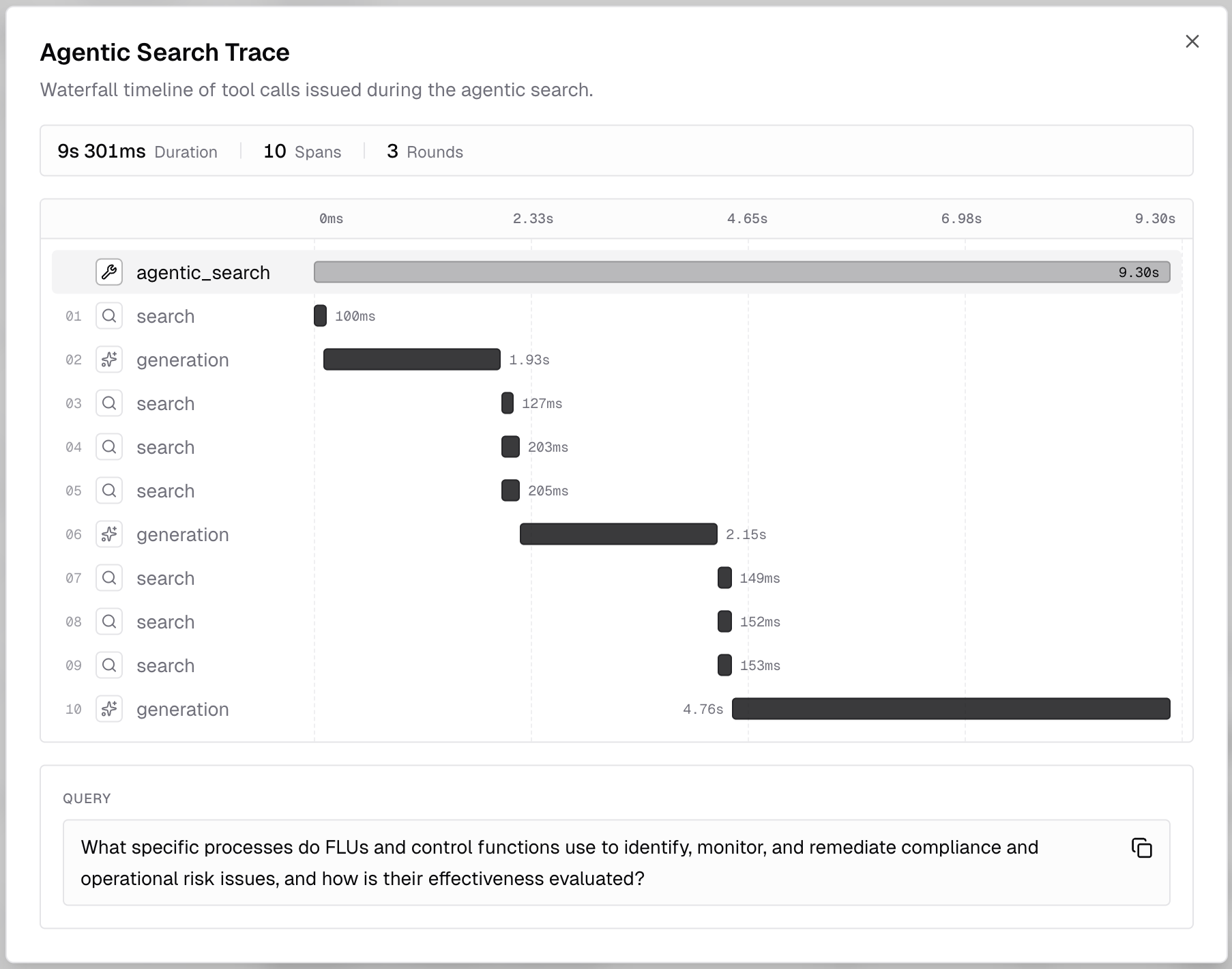
The same data is available programmatically by listing store events with
event_type=agentic_search. Each event captures the original query,
instructions, rounds executed, token usage, and the ordered list of tool calls
the agent issued (with arguments, result, duration, and any error).
Tool call fields follow the
OpenTelemetry GenAI semantic conventions,
so traces interoperate with standard observability tooling.
For the full response schema, see List Store Events. Use these events to debug unexpected results ("why didn't the agent find X?") or build dashboards on top of the agent's behavior.
You can also have these traces pushed to your own observability backend (Langfuse, or any OTLP collector) as they happen; see Trace Export.
Tips
- Start with the defaults.
agentic: truewith no instructions is a strong baseline for most workloads. - Use
instructionsto encode domain knowledge the agent can't infer from the query (e.g. preferred source types, entity disambiguation rules). - Keep
strict_top_k=falsewhen you need high precision, as the agent will not include irrelevant chunks in its output. - Combine with
mixedbread/webfor hybrid runs that mix internal stores with the open web in a single ranked list. - Inspect the trace when results surprise you. The dashboard waterfall and the events feed show every round, sub-query, and tool call, so you can see which searches the agent ran and why a chunk was or wasn't found.