Trace Export
Send your agent traces to Langfuse, Braintrust, or any OTLP collector you own. Every agentic search, chat completion, and Q&A run is exported as OpenTelemetry spans, the same trace the dashboard shows.
Every search and generation on Mixedbread produces a structured trace: the query, the tool calls the agent issued with their arguments and results, the model turns with their token usage, and the chunks that came back. The dashboard renders these traces, and trace export pushes the same data to an observability backend you own, as OpenTelemetry spans, moments after each run finishes.
Traces land next to the rest of your LLM observability, so you can search them, score them, and alert on them with the tooling you already use.
What gets exported
Each exported trace is one run, with a root span for the request and a child span
per recorded step: execute_tool spans for retrieval tool calls (with their
arguments and results) and chat spans for model turns (with their token usage).
Attributes follow the
OpenTelemetry GenAI semantic conventions,
so Langfuse and Braintrust classify them as tool and generation observations
automatically and other OTel tooling reads them without configuration.
The export is exactly the customer-facing trace you see in the dashboard and the events API. Mixedbread's internal spans (databases, retrieval backends, inference infrastructure) are never sent.
You choose per destination which trace kinds to export:
| Trace kind | Contents | Exported by default |
|---|---|---|
| Agentic search | The agent's rounds, tool calls, and model turns | Yes |
| Chat completions | Completion and Responses turns, grouped per conversation | Yes |
| Question answering | Each Q&A request's retrieval and answer generation | Yes |
| Search | Every plain search (high volume) | No |
| Grep | Regex matches over your stores | No |
Chat completion turns in the same conversation share a session id, so a resumed chat reads as one thread in Langfuse instead of unrelated traces.
Large runs are kept deliverable rather than dropped: a trace carries up to 50 result chunks, chunk text is truncated to 2,000 characters, and any single span field is capped at 128 kB.
Setup
Connect a destination
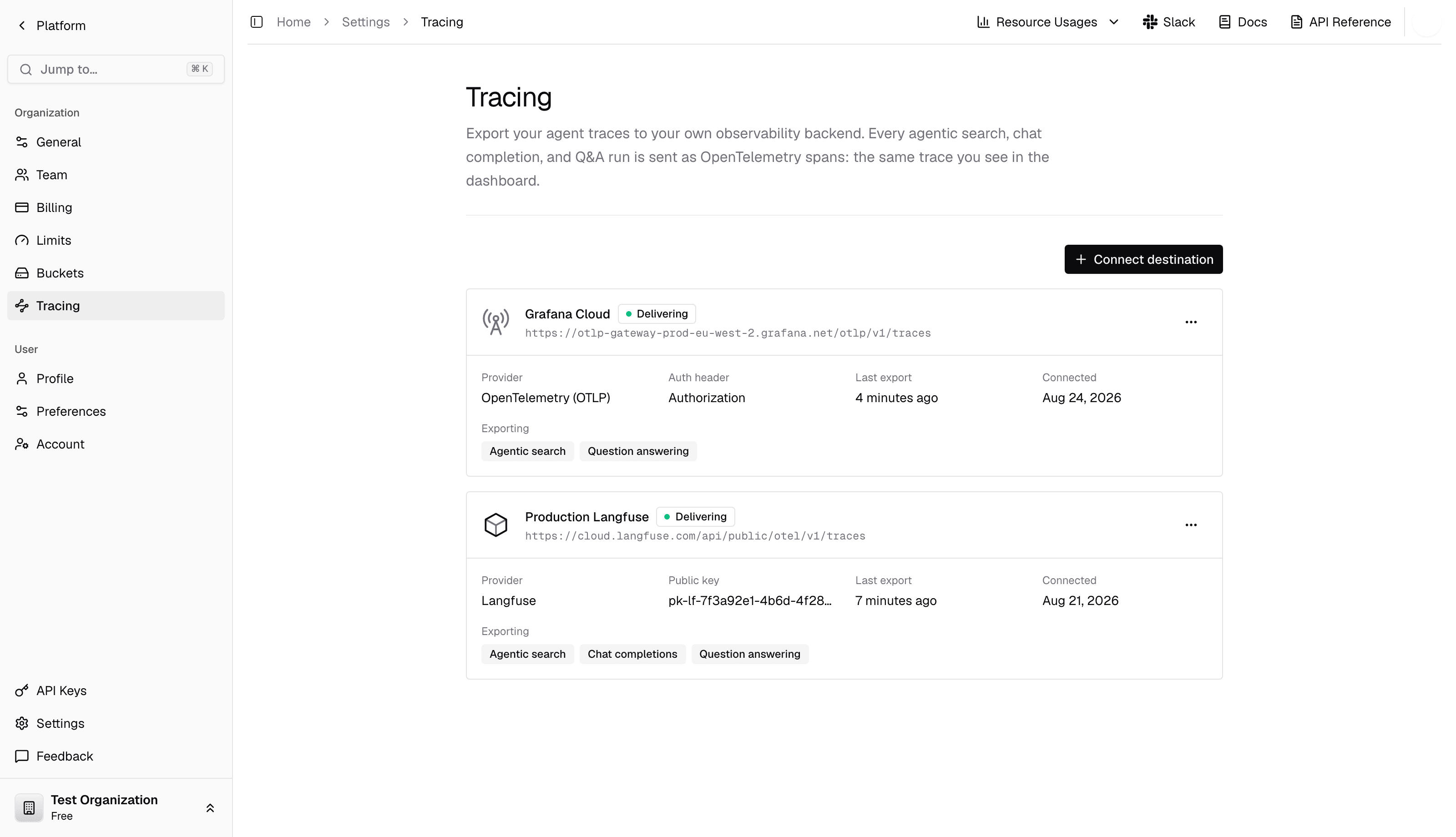
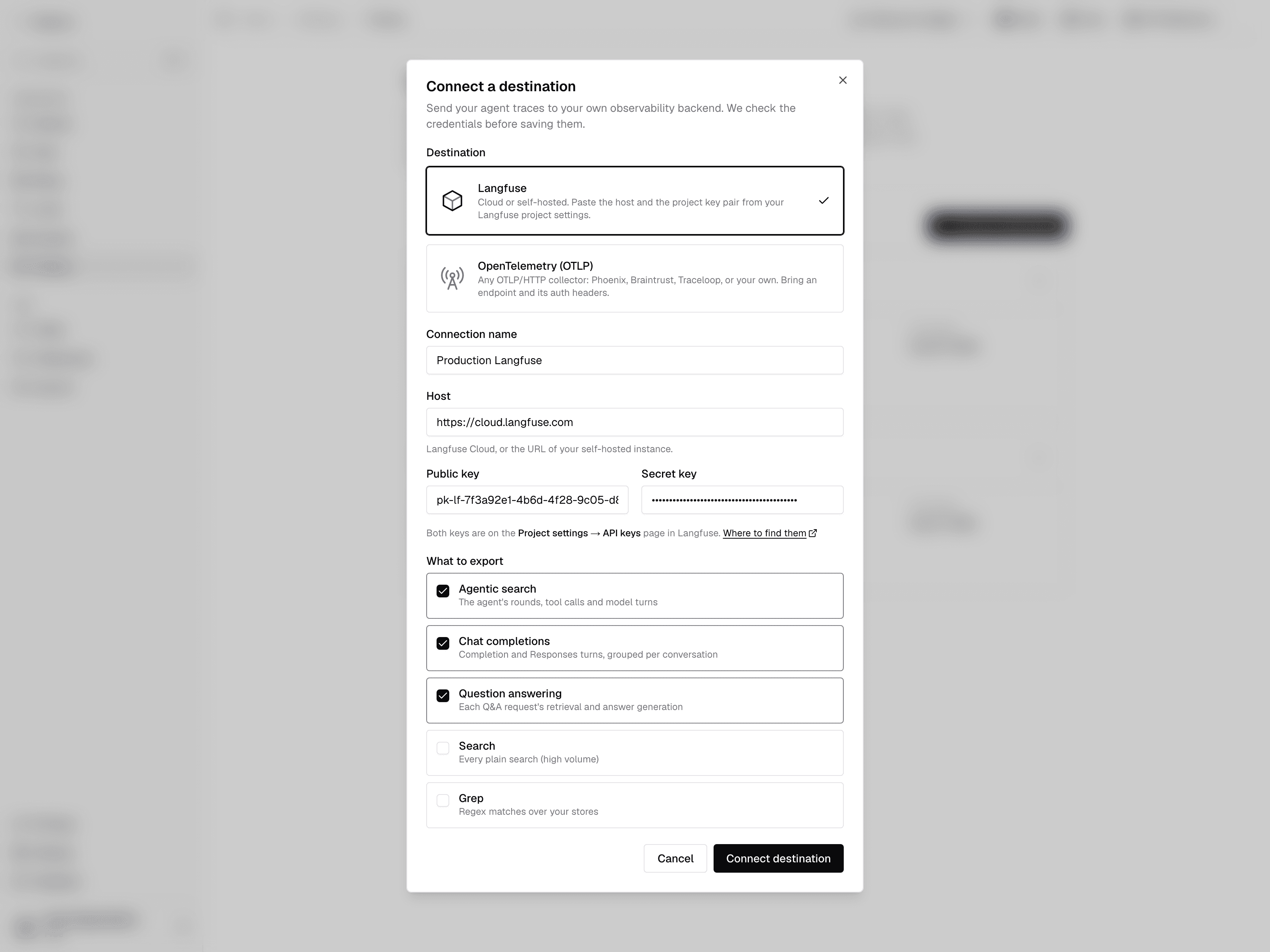
In the dashboard, go to Settings → Tracing and click Connect destination. Pick Langfuse, or OpenTelemetry (OTLP) for Braintrust and everything else.
Choose what to export
Agentic search, chat completions, and question answering are on by default; plain searches and grep are off because of their volume.
Save and run a search
Saving checks the credentials against the destination, so a wrong key fails here instead of silently dropping traces later. Traces then arrive within seconds of each run, and the destination card shows the delivery status.
Langfuse
Langfuse Cloud or a self-hosted instance. Three fields, all from Project settings → API keys in Langfuse:
| Field | Value |
|---|---|
| Host | https://cloud.langfuse.com, or your self-hosted URL |
| Public key | pk-lf-… |
| Secret key | sk-lf-… |
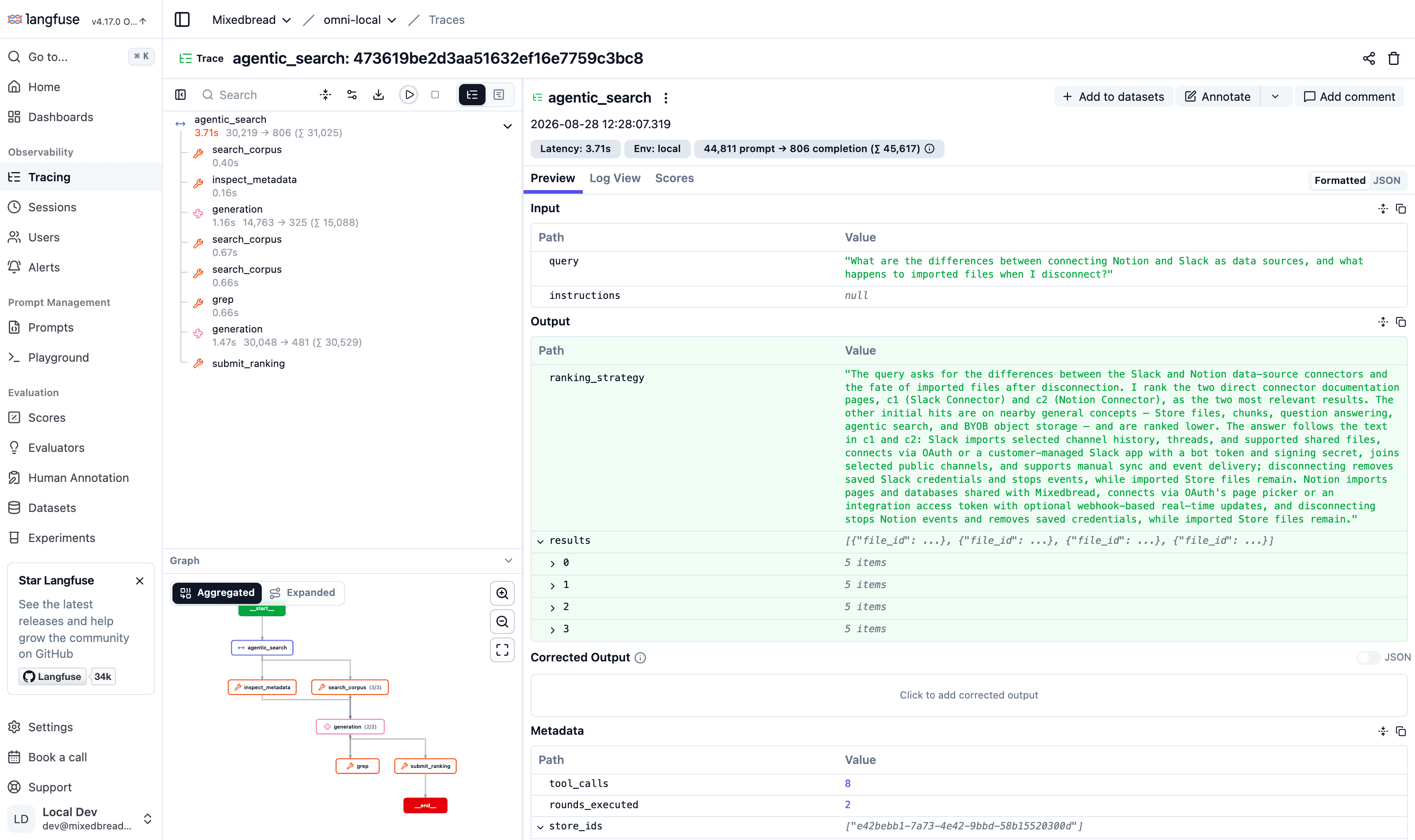
Here is an exported agentic search in Langfuse: the root span with the query and final ranking, tool spans for each retrieval call, and generations with their token usage:
Braintrust
Braintrust ingests OpenTelemetry directly, so connect it as an OpenTelemetry (OTLP) destination: set the traces URL, and the two headers Braintrust authenticates and routes with.
| Field | Value |
|---|---|
| Traces endpoint | https://api.braintrust.dev/otel/v1/traces (EU: https://api-eu.braintrust.dev/otel/v1/traces) |
| Headers | Authorization and x-bt-parent, one per line |
Authorization: Bearer <BRAINTRUST_API_KEY>
x-bt-parent: project_name:My Project- Authorization carries a Braintrust API key from Settings → API keys.
- x-bt-parent decides which project the traces land in. Use
project_name:<name>orproject_id:<uuid>. Braintrust has no default project for OTLP, so leave it out and the connection check fails.
Traces arrive under the project's Logs, one row per run. Braintrust reads the GenAI attributes, so retrieval calls render as tool spans and model turns as generations with their token usage:
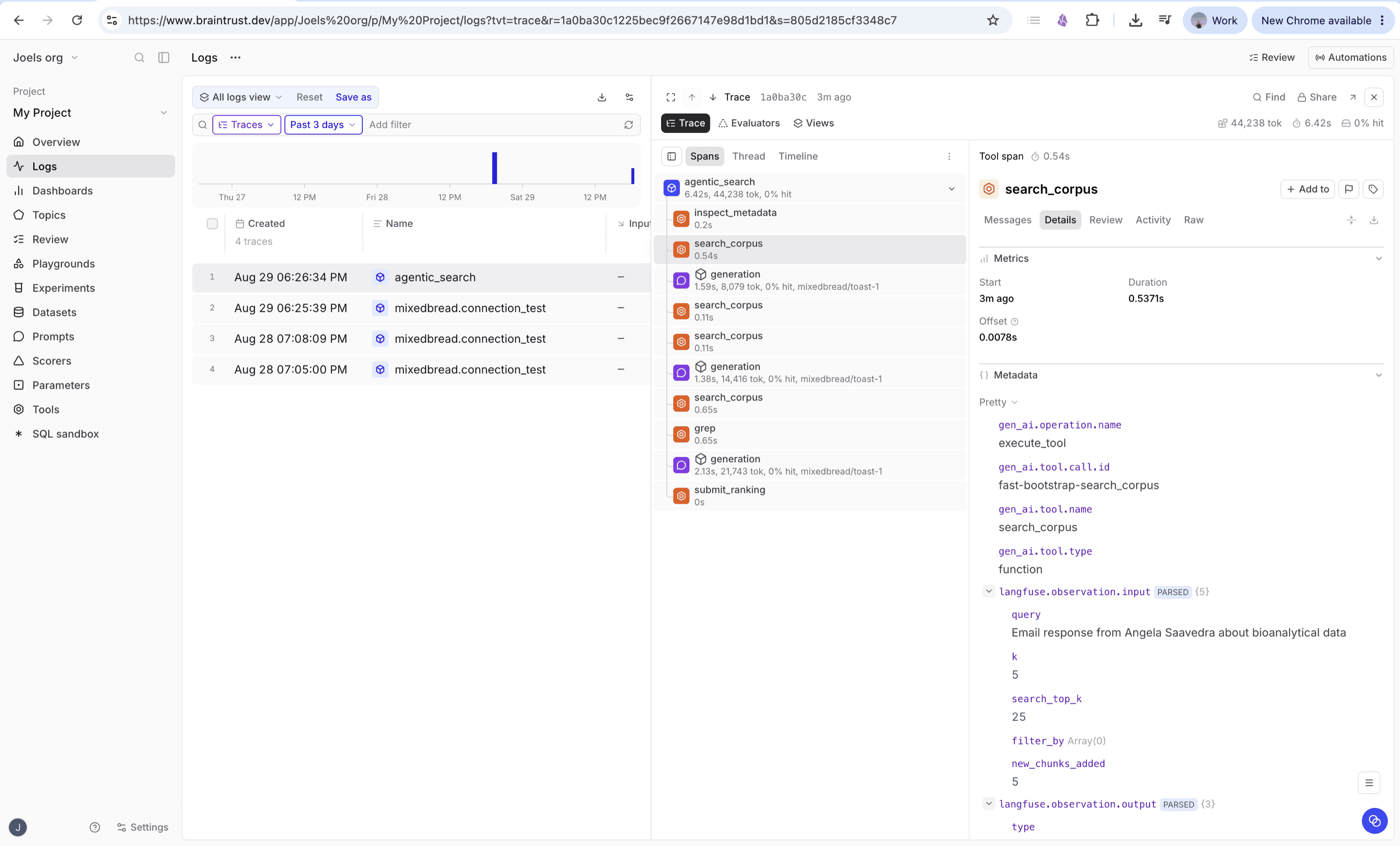
The connection check shows up there too, as a mixedbread.connection_test
trace: Braintrust rejects an OTLP request that carries no spans, so the check
sends a single empty one instead. It is safe to delete.
Other OTLP collectors
Phoenix, Traceloop, Grafana, or your own collector connect the same way as Braintrust: the OTLP/HTTP traces path as the endpoint, plus whatever headers it authenticates with. gRPC collectors are not supported.
Delivery
Export is best-effort by design: a slow or failing destination never affects the request that produced the trace. Deliveries are batched and usually arrive within seconds of the run finishing.
- Status. Each destination card shows one of Delivering, Waiting for traces, Failing (with the destination's last error), or Paused.
- No duplicates. Trace and span ids are derived deterministically from the event, so a retried delivery overwrites the previous one instead of creating a duplicate trace.
- Pause and resume. Pausing stops exports without forgetting the configuration. Traces produced while paused are not backfilled.
Security
Traces contain your queries, retrieved content, and generated answers, so only connect backends you control. Credentials are encrypted at rest and write-only: the API returns only a non-secret hint (the Langfuse public key, or the auth header name). For organizations using Bring Your Own Bucket, customer content is blanked from exported traces, matching the events API.
Troubleshooting
A destination shows Failing: the card displays the destination's last error response. After fixing the cause (rotated keys, changed endpoint), use Update credentials on the destination; delivery resumes with the next trace and the status clears on the first success.
Traces are missing: check that the trace kind is enabled on the destination. Plain searches and grep are not exported unless you turn them on.