Granola Connector
Import selected Granola notes and folders into a Mixedbread Store with manual or scheduled synchronization.
The Granola connector imports selected meeting notes and folders into a Store. It authenticates with a Granola Personal API key, receives note changes through a Granola webhook that Mixedbread manages, and supports manual or scheduled synchronization.
Before you begin
You need:
- a Granola account with access to the notes you want to import;
- permission to create a Personal API key; and
- a Mixedbread organization with access to Data sources.
Create a Granola API key
Open Granola settings
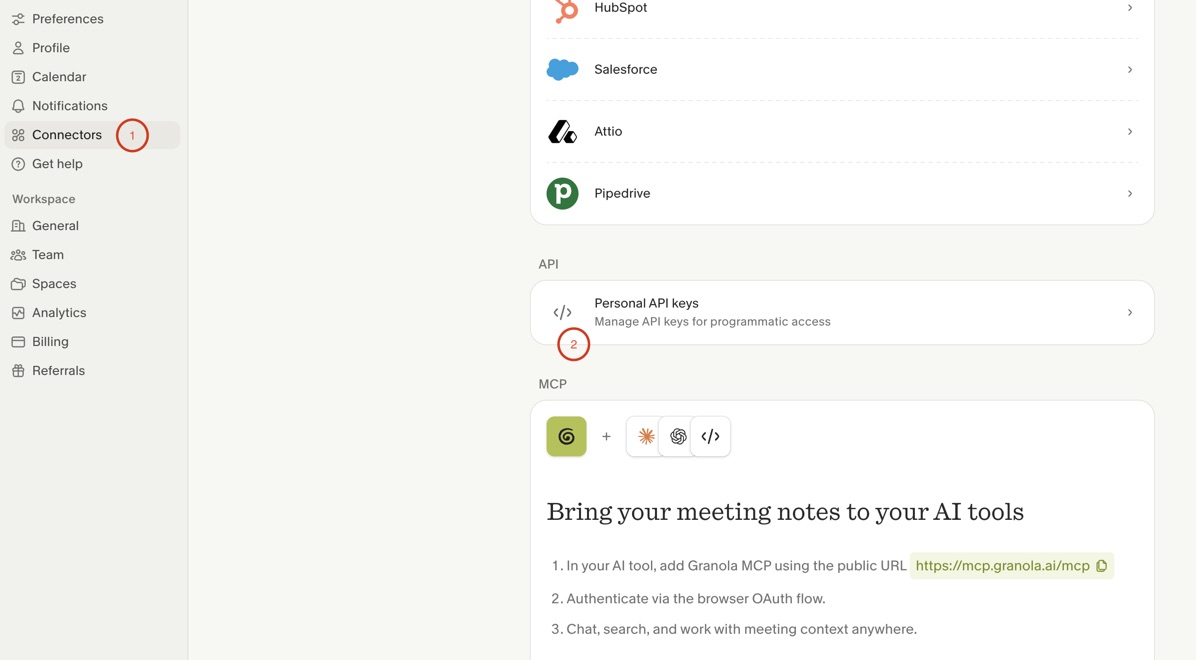
In Granola, open Settings → Connectors.
Open Personal API keys
Under API, select Personal API keys.
Create the key
Create a new key and grant the access scopes required for the folders and notes you intend to synchronize.
Copy the key
Copy the key when Granola displays it. Store it securely because it grants access to the selected Granola data.
Connect Granola
Choose Granola
In the Mixedbread Platform, open Data sources, select Create, and choose Granola.
Enter the API key
Paste the Granola Personal API key, which begins with grn_.
Choose a sync schedule
Select Manual, Every 10 minutes, Hourly, Daily, or Weekly.
Choose the destination Store
Enter an optional Store name and review the Store configuration. Leave the
name blank to use granola-notes-{key - id}.
Finish the connection
Select Connect Granola.
Select notes and folders
Browse the Granola catalog and select the folders and individual notes to import.
Manage synchronization
Open the Granola data source to:
- browse and search folders and notes;
- synchronize or exclude selected items;
- refresh the Granola catalog;
- change the synchronization schedule;
- run Sync now; or
- disconnect the account.
Turning off periodic synchronization leaves Sync now available. Excluding an item or disconnecting Granola does not delete notes already imported into the Store.
How updates arrive
Mixedbread registers a Granola webhook for the connected API key and manages it for you, so there is nothing to configure in Granola. The webhook is created when you connect, replaced when you reconnect with a new key, and removed when you disconnect. Data sources connected before webhooks were available receive one automatically once they have notes or folders selected.
When a selected note is generated, edited, or shared with the key's owner, Granola notifies Mixedbread and the note is imported again, whatever the synchronization schedule. Granola sends no event when a note is deleted, so the synchronization schedule removes deleted notes and catches any change a webhook missed.
Granola plans or workspace settings that do not allow webhooks leave the data source on its synchronization schedule alone.
Troubleshooting
No folders or notes appear
Confirm that the Personal API key has the required access scopes. Refresh the catalog after changing scopes or making new notes available.
The API key no longer works
Create a new Personal API key in Granola and reconnect the data source. Treat the key as a secret and revoke keys that are no longer used.
Edited notes only update on the schedule
Your Granola plan may not include webhooks. Otherwise, Granola switches off a webhook after its deliveries fail for several days; reconnect the data source to register a new one.
Scheduled updates are not running
Open the connector and verify that the schedule is not set to Manual. Run Sync now to test access immediately.